Aurora page dialog reference
Open Hardware > SoC Options > Aurora.
You have to select Aurora Trace Port in Hardware > SoC Options > Analyzer for Aurora interface use.
Supported architectures
Arm Cortex
Aurora trace is supported with Arm HSSTP II Active Probe, which is available for iC7max/iC5700 BlueBox.
Infineon TriCore
TriCore emulation devices implement 1 lane Aurora interface. For these devices the selection is disabled and forced to 1. Selection of lanes depends on the TriCore device used, but may be additionally limited if only a portion of lanes is physically connected to the Aurora trace port connector on the target board.
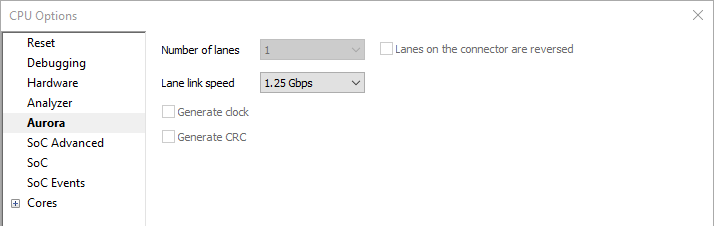
Number of lanes
Select the number of lanes available for the Aurora trace. This selection depends on the microcontroller you are using, as well as your target board design.
Lane link speed
Select the highest possible baudrate that still works on your target board. It is best if you start with the higher baudrates and then switch to lower ones until you get a stable trace line connection.
By default the lowest Aurora link speed is set which ensures the most likely working trace operation. Note that this setting directly impacts on Aurora trace interface bandwidth. The higher the speed, more trace information per time unit can be broadcasted over the interface. Hence, once the Analyzer trace operation is confirmed with the default setting, higher Aurora link speeds should be tested and the highest operational speed then selected for usage. This way the Active Probe will be configured for maximum possible Analyzer session time.
Generate clock
HSSTP (High Speed Serial Trace Port) can use an external reference clock (REFCLK) to produce the desired high-speed trace clock. Provisions for this clock signal have been made on the connector (pins CLK+ and CLK-). If the reference clock source is available on your target board, this is not needed. Alternatively you can enable this option and BlueBox will generate the reference clock signal for you.
Generate CRC
This option adds CRC generation to Aurora packets. Since this incurs extra trace data overhead, enable this option if trace results are suspect or so advised by Technical support.