Arm Cortex-M Fault Reports
In this topic:
Introduction
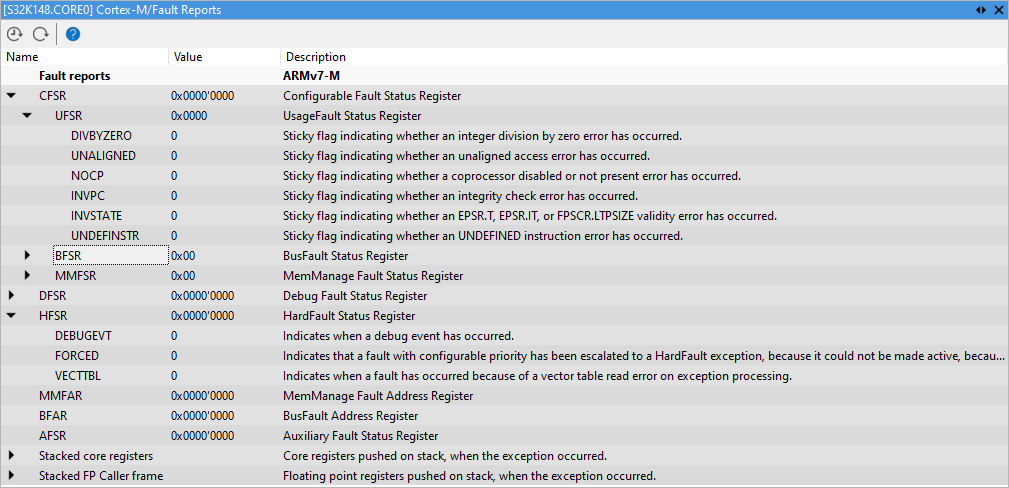
Cortex Fault Reports core plugin for winIDEA is used to view Cortex exceptions and the exception context in a dedicated plugin window. The plugin can be loaded by selecting View | [<device>.COREn] Cortex-M | Fault Reports.
Example: the CPU stopped in memory exception handler.
Toolbar
Button |
Description |
|---|---|
|
Enable automatic update, which is indicated by a [Rt] in the plugin title, e.g. [DA14699.Cortex-M33] Cortex-M/Status [Rt] |
|
Manually update the window |
|
Go to winIDEA Help |


Troubleshooting
•Only hard fault exceptions are enabled on the CPU by default. If you would like to see more detailed exception description, then other types of exceptions need to be manually enabled in the code. This can be achieved by writing the value 1 in the USGFAULTENA, BUSFAULTENA and MEMFAULTENA bitfields located in the SHCSR register. Unless these exceptions are enabled the CPU will always throw a hard fault exception.
•Exception Context is only available on the entry point of the exception handler.
|
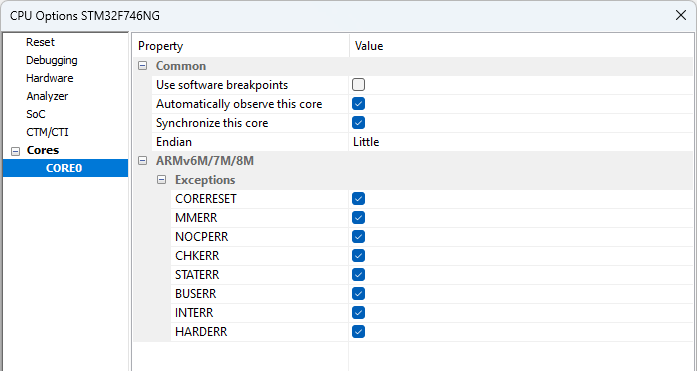
The exception handler can corrupt the data stored on the stack. To ensure that the CPU is stopped at the handler entry point it is recommended that you enable exception catch mechanism in winIDEA. |

In order to do so, open Hardware | SoC Options | CPU (Core0) dialog and check the exceptions as shown below. Example: Cortex Exceptions Catch Setting.
More resources
 Fault and Exception Debug with an use case in winIDEA IDE - Webinar Debug and Trace on Cortex-M4 based Microcontrollers Measuring Runtime with DWT Cycle Counter with an use case in winIDEA IDE - Webinar Debug and Trace on Cortex-M4 based Microcontrollers